
Create skills
Shape your AI the way you want it. A skill is a short set of instructions that KIplatz follows in a conversation, much like choosing the paint, seats and wheels yourself when you buy a new car. Write it down once, and you never have to explain the same thing again.
Tip
The quickest way is My AI: 3 questions to tap, and the program writes your first set of instructions for you.
Take a template
- Click “Skills” on the left.
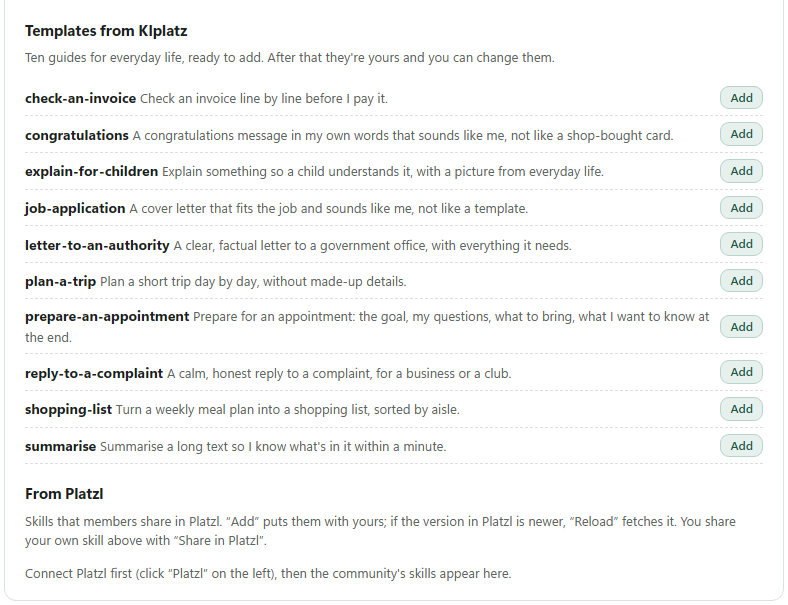
- Under “Templates from KIplatz” you'll find 10 sets of instructions for everyday life.
- Click “Add” on the one that fits. After that it's yours, and you can change it.
| Example | What it's for |
|---|---|
| letter-to-an-authority | a clear, factual letter to a government office, with everything it needs |
| check-an-invoice | check an invoice line by line before you pay |
| shopping-list | a shopping list from your weekly plan, sorted by aisle |
| explain-for-children | explain something so a child understands it |
| summarise | shorten a long text so you know in a minute what it says |
Write your own
- Click “Write a new skill”. A text field with a pattern opens.
- At the top, enter a short name after “name:” and, after “description:”, one sentence on what it's good for.
- Below that, write the instructions as you'd give them to a person: what comes first, what must never be missing, what must never go in.
- Click “Save”.
Tip
The name becomes a folder name in lower case: the program turns “Check an invoice” into “check-an-invoice”.
Try it out in a conversation
Type a slash “/” in the input field and the list of your skills opens. Keep typing to search, then pick one with Enter or a click. You can do the same with the plus on the left of the field and “Choose a skill”. The chosen skill then shows in green in the bar of the input field and applies to this conversation. If the result isn't right, click “Edit” next to it in your list, change the instruction and ask again.
Always on
Some things you want in every conversation, for example instructions that always keep answers short. Tick “Always on” for them, and they apply in every conversation, new ones included, without you having to look for them. You can do this under Skills and in the middle of a conversation: on the PC with “Always on …” next to the list, in the app with the plus next to the input field. You choose all the others as before, only where they fit.
Pass it on, bring one in
“As ZIP” saves a set of instructions as a file you can pass on. With “Import (ZIP or SKILL.md)” you bring in someone else's. SKILL.md is an open format that other AI programs read too, so anything from there works here as well.
To share yours with the whole community, help build in the workshop: attach the file or send it as a change proposal, along with the licence it should be published under. Once it's been checked, every member gets it in the program.
Good to know
Each set of instructions is just text, at most 20,000 characters. Nothing in it is run, scripts in a ZIP file are skipped, and every one is checked against the house rules.