
Memory
KIplatz only remembers what you explicitly tell it. You can see everything that's stored at any time and delete it with one click.
Remembering with one sentence
Just type one of these sentences into the input field, like any question. They work in English and in German:
| You write | What happens |
|---|---|
| “Remember: I live in Leeds” | KIplatz knows it from now on |
| “Please remember that I'm vegetarian” | the same; the wording is up to you |
| “Forget what I said about Leeds” | that entry is gone |
| “Forget everything” | all entries are gone |
| “What do you know about me?” | you get the whole list |
The window answers these sentences itself, in the language you wrote them in. “Remember to …” and questions like “Do you remember …?” stay ordinary questions. Nothing leaves your PC.
View and delete under Privacy
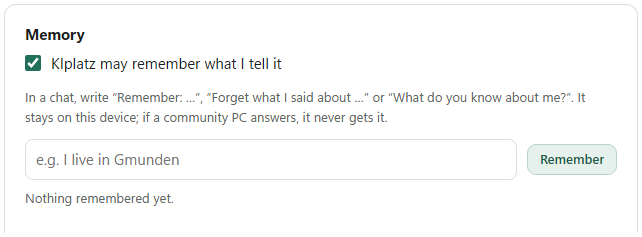
- Click your device name at the bottom left, then “Settings”. On the left, choose the tab “Privacy”; the card “Memory” is at the top.
- Every entry is listed there, each with a date.
- The small cross next to an entry deletes just that one.
- “Forget everything” empties the whole list, after asking you to confirm.
You can also type something into the field above and click “Remember”. The switch “KIplatz may remember what I tell it” turns remembering off completely.
Only your own sentences
Nothing is guessed or picked up in the background. Entries come from your sentences and from 2 of the questions at first start: what KIplatz should call you and where you live. What you need KIplatz for and how it should answer isn't kept here but under My AI. The morning briefing also uses where you live.
There's room for 60 entries of up to 300 characters each. If you add one when the list is full, the oldest drops out.
Good to know
The list is kept as a file in your PC's data folder. If another PC in the community answers your question, it never receives the list. More under Privacy.